


Schedule content releases
Schedule content releases
You can release sections on a schedule to drip content over time. Instead of making everything available at once, you unlock sections week by week or on specific dates.
How it works
Each section can have a release date and time. Before that date, participants see the section in their sidebar with a countdown (“Available in: 3 days”) but can’t access the content. When the release time arrives:
- The section unlocks and participants can open it
- Participants receive a notification that new content is available
Sections without a release date are available immediately.
Set a release date
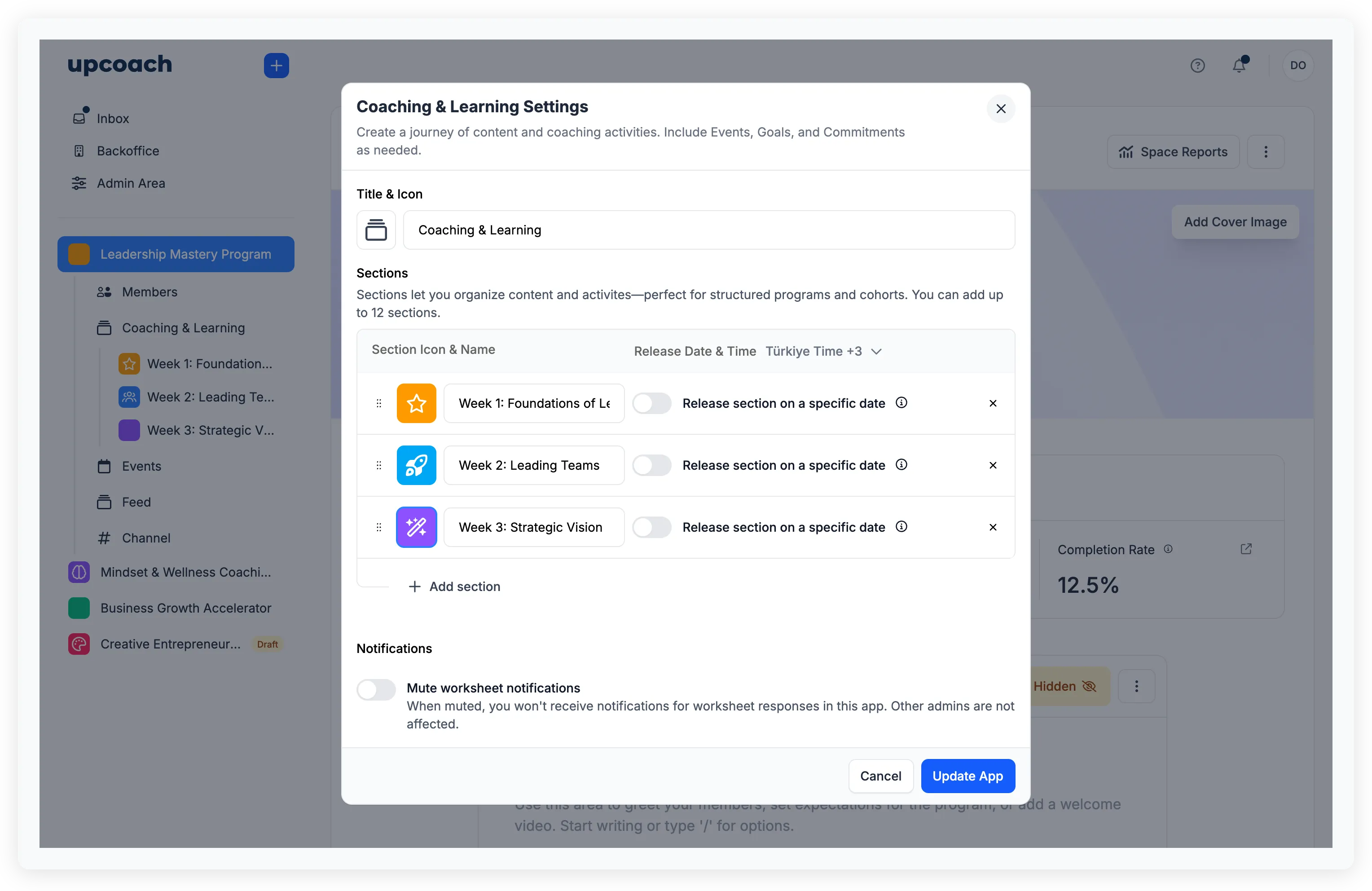
Open the Coaching & Learning settings (click the app in the sidebar, then open its settings). Each section has a “Release section on a specific date” toggle. Turn it on and set the date and time.
You can also edit a section’s release date by hovering over it in the sidebar, clicking the dropdown menu, and selecting Edit.
The timezone for all release dates is shown at the top of the section list. You can change it from the dropdown — it defaults to your timezone but can be set per app.
Change or remove a release date
Edit the section and change the date, or toggle the release off to make the section available immediately. If you change a release date, the scheduled notification updates to match the new time.